Record yourself reading, or pick a natural-sounding narrator. Either way, the book reads itself from then on.
Back to the order formOne-time add-on
Read it to them, even when you can't be there.
Scrively Studio adds narration, music and sound effects to a book you've already made. Record it in your own voice so they can hear you read it on the nights you're not home, or choose a natural-sounding narrator and let the story tell itself. Add tappable surprises and choose-your-path moments whenever you want more.
Your voice or a narratorMusic and sound effectsCredits never expire
What It Is
Their book, out loud, in a voice they know.
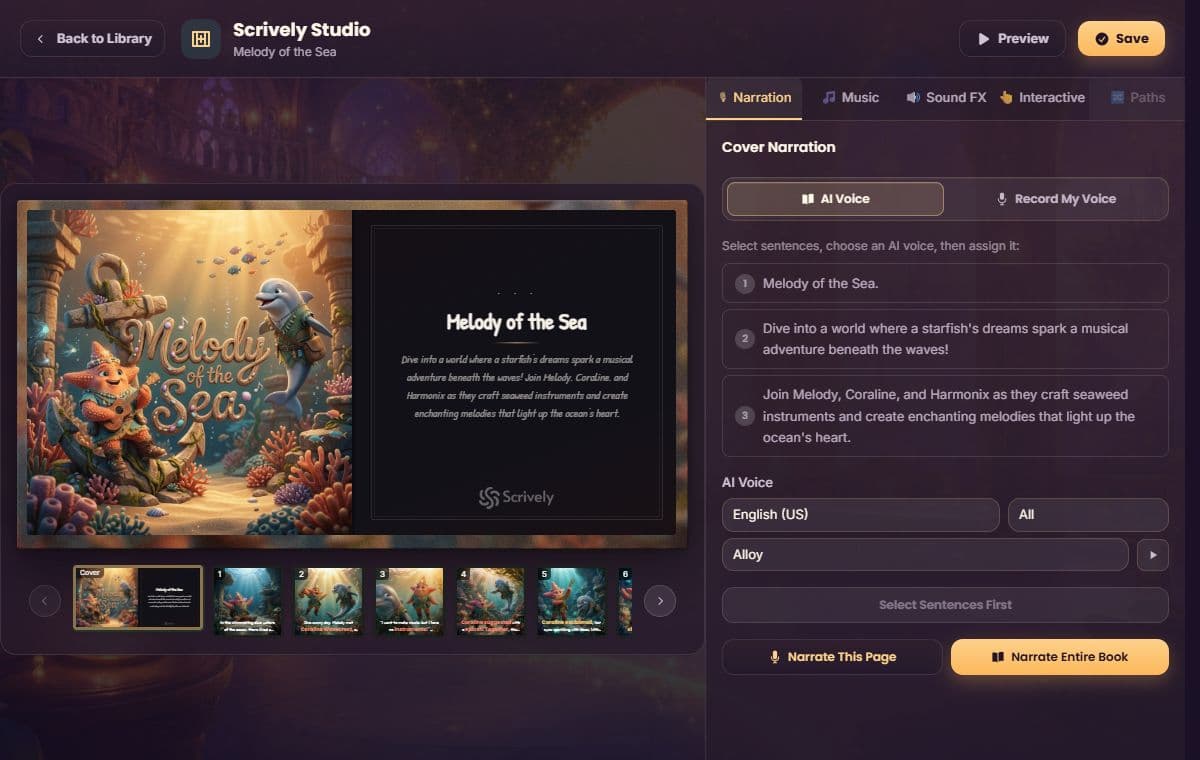
Studio opens from any finished Scrively book. Add narration, either an AI voice reading each page or a recording of your own, plus background music and sound effects that match what's happening in the scene.
Record it once in your voice, or a grandparent's, and it stays with the book. Long car rides, hotel rooms, nights when bedtime runs late and someone else is doing the tucking in. The story still reads itself out loud, in a voice they know.
Want more than a listen-through? Add tappable spots kids can press for a sound or a surprise, or build branching choices so they decide what happens next. Or keep it simple with narration alone. Every book is your call.
Background music and scene-matched sound effects that make a quiet moment feel quiet and a big reveal feel big.
Hotspots to press and choose-your-path decisions, for the books that deserve the full treatment.
Inside Scrively
One screen. The whole toolkit.
Open a completed story from your library and Studio loads right there. Narration, music, sound effects and interaction tools, all on the same screen as the book itself.
What You Unlock
Everything you can layer onto a finished book.
Your own voice, kept forever
Record yourself, or a grandparent across the country, reading each page. It saves with the book in a voice they'll always know.
A narrator for the other nights
Pick a natural-sounding AI voice and the book reads itself when you can't. No recording required.
Music and effects per scene
Soft music for a quiet page, a sound effect for the big surprise. Set the mood moment by moment.
Tap, play and choose
Add spots kids can tap for a sound or animation, or branching choices that let them steer the story.
How It Works
Simple enough to do tonight, after they're asleep.
Add it to your book package now, then use the credits whenever a book is ready. Nothing expires, and you don't have to finish anything today.
Open a finished book
Studio works on books you've already completed, so the story and illustrations are done and waiting.
Add a voice, then the extras
Record yourself or choose a narrator, then layer in music, sound effects and interactive moments if you want them.
Press play
Listen through, adjust anything that sounds off, and save. That's the version they'll hear from then on.
Add It To Your Order
One price. Every book in your collection.
The pricing builder gives you a starter credit plus matching credits for every book you choose, so the add-on grows with your collection instead of charging you book by book.
1 Scrively Studio credit to startAdditional credits matched to every book in your packageAI narration plus your own voice recordingMusic, sound effects, tappable hotspots and branching choicesNo monthly fee, just a one-time add-on
One-time add-on+$47
No subscription, ever. Credits wait in your account until you're ready to use them.
Add Scrively Studio To My OrderGood To Know
Questions parents ask before adding it.
Do I need Studio to use Scrively normally?
No. Every Scrively book works beautifully on its own. Studio is optional, for when you want a finished book to read itself out loud and be tapped through.
Do the credits expire?
Never. Add Studio with your order now and use the credits whenever a book feels ready for a voice.
Can I keep it simple, just narration?
Absolutely. Plenty of books only ever get a narrated voice and a little music. Sound effects and interactive choices are there if you want them later.
Can I record my own voice instead of using AI narration?
Yes. Studio lets you record your own narration for any page, alongside the AI voice option. Grandparents, a parent away for work, anyone whose voice belongs in the book.
Add Scrively Studio+$47 one-time with your Scrively package
Add to order